

This manual provides instructions on how to effectively use the GUI for managing and monitoring your irrigation system’s devices.
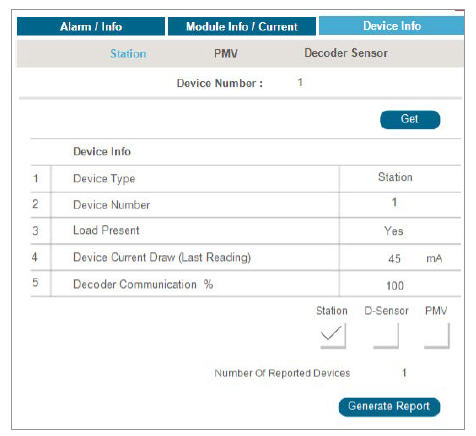
- Enter Device Number: Input the desired Device Number into the designated field.
- Retrieve Information: Click the Get button to retrieve detailed information about the specified device.
Understanding Displayed Information
- Device Type: Indicates whether the device is a station, Pressure-Modulating Valve (PMV), or decoder sensor.
- Device Number: Displays the unique identifier number assigned to each device.
- Load Current Draw (Last Reading): Shows the last recorded current draw of the device in milliamperes (mA).
- Decoder Communication %: Represents the percentage of successful communication between the decoder and sensor associated with the device.
Report Generation
- Select Devices for Report: Check the boxes next to Station, D-Sensor, or PMV to include these device types in your report.
- Enter Number of Devices: Input the number of devices you wish to include in the generated report.
- Generate Report: Click the Generate Report button to create a report based on your selected criteria.
Still need help? We're here.
Tell us what you need support with and we'll find the best solution for you.