

The Irrigation Controller Main Menu provides an intuitive interface for efficiently managing and controlling your irrigation controller. This pop-up simplifies monitoring and adjustment of irrigation settings.
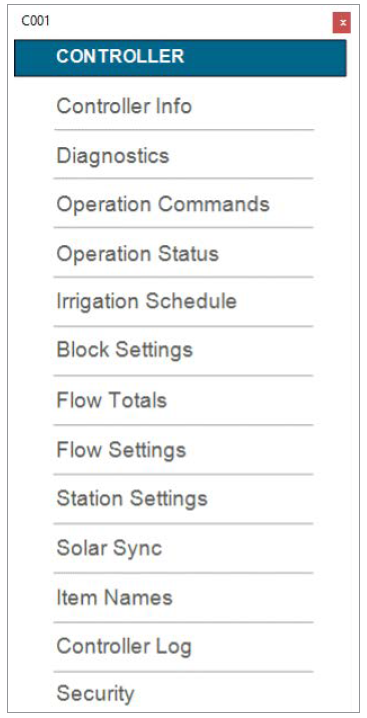
Controller Main Menu
| Interface | Description | Purpose |
|---|---|---|
| Controller Information | Access detailed information about the irrigation controller | Provide essential details such as model, version, and current system status |
| Diagnostics | Run diagnostic tests to identify system issues | Facilitate troubleshooting and ensure optimal system performance |
| Operation Commands | Execute specific commands manually | • Start or stop irrigation cycles instantly • Allow override for maintenance or emergencies |
| Irrigation Schedule | Set up or adjust watering schedules | • Define when each zone should be watered • Optimize water usage based on plant needs and weather conditions |
| Block Settings | Configure settings for specific blocks | Customize irrigation parameters (e.g., duration, frequency) for different landscape sections |
| Flow Totals | Monitor total water usage | • Track water consumption over time • Aid in water conservation efforts |
| Flow Settings | Adjust flow rates for individual zones | • Optimize water distribution • Prevent overwatering or underwatering |
| Station Syncs | Synchronize settings across multiple stations | • Maintain consistent operation across all zones • Ensure consistent watering patterns |
| Solar Sync® | Integrate solar sensors (if available) | • Automatically adjust watering based on real-time weather conditions • Enhance water efficiency |
| Item Names | Customize names for system components | • Easily identify zones, valves, and sensors • Simplify management and troubleshooting |
| Controller Log | Review logs of controller activities | • Track changes made to settings • Investigate anomalies or errors |
| Security | Set up security features | • Prevent unauthorized access or modifications • Protect your irrigation system |
Controller Info
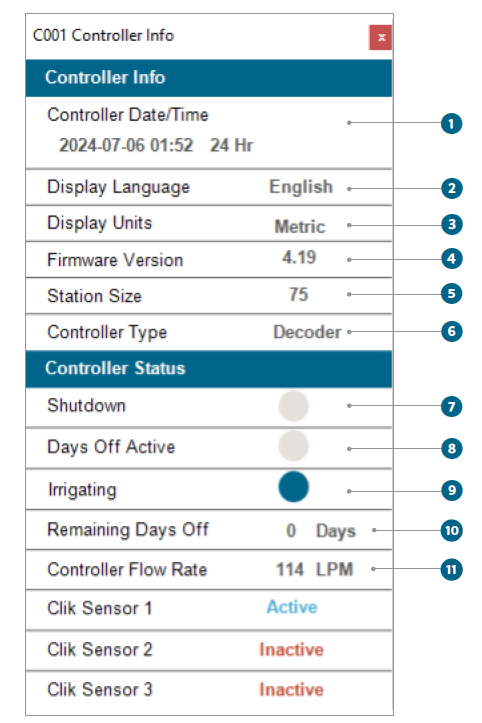
The Controller Info Graphical User Interface (GUI) provides critical information and status updates about the irrigation system. This manual will guide you through understanding each section and its components.
This section displays essential details about the controller settings and configurations.
- Controller Time/Date: Displays the current date and time set on the controller
- Controller Display Language: Shows the language setting for the controller's display
- Controller Display Unit: Indicates the measurement units used by the controller
- Firmware Version: Displays the current firmware version running on the controller
- Station Size: Indicates the number of stations (zones) managed by the controller
- Control Type: Describes the type of control used by the irrigation system
- Shutdown: Shows if the controller is currently in shutdown mode
- Days Off Active: Indicates whether the Days Off feature is enabled
- Irrigating: Displays if the irrigation system is actively watering
- Remaining Days Off: Shows the number of days left in the Days Off period
- Controller Flow Rate: Displays the current water flow rate through the system
Still need help? We're here.
Tell us what you need support with and we'll find the best solution for you.