

This user manual provides instructions for using the GUI to effectively manage and control your irrigation system.
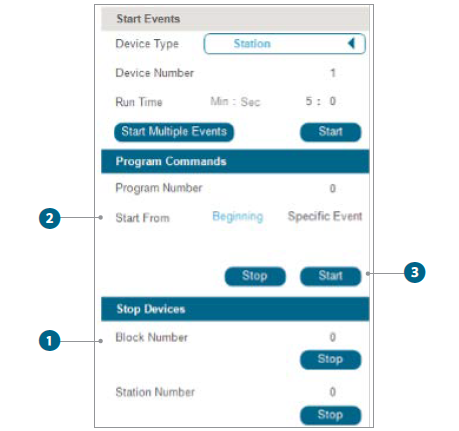
Start Events Section
- Device Type: Select the type of device you wish to control from the drop-down menu.
- Device Number: Enter the unique identifier number assigned to your device.
- Run Time: Set the duration for which you want the device to operate. Input the duration in minutes and seconds in their respective fields.
- Start Button: Press the Start button to initiate the irrigation process with the specified settings.
Program Commands Section
- Program Number: Choose a program number to execute preset commands.
- Start From: Decide whether to start the program from the Beginning or for a Specific Event.
- Control Buttons: Use Stop to halt any running program. Use Start to begin the execution of the selected program commands.
Block Events Section
- Block Number: Assign a block number if your irrigation system is divided into multiple blocks or zones.
- Station Time: Set the duration for which a particular block should run. Input the time in minutes and seconds under the Station Time field.
- Control Buttons: Press Stop to cease operation of the block. Press Start to initiate watering for a specific block with the defined settings.
Still need help? We're here.
Tell us what you need support with and we'll find the best solution for you.