

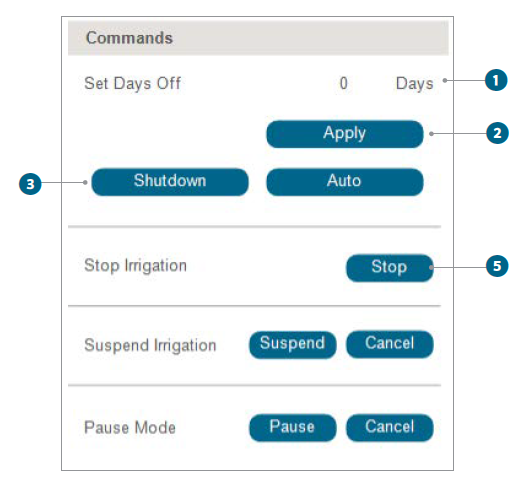
The GUI enables you to manage operational days and shut down, stop, suspend, or pause irrigation processes as needed.
- Program Non-Operational Days: Enter the number of days you want to designate as nonoperational in the provided field.
- Apply Settings: Click the blue Apply button to save your settings for nonoperational days.
- Complete System Shutdown: To completely turn off all system operations, press the blue Shutdown button.
- Confirmation: Confirm any prompts that may appear to ensure the system has shut down completely.
- Immediately Halt Watering Activities: Click the red Stop button to immediately cease all ongoing irrigation activities.
- Manual Resume Required: This action will stop irrigation until manually resumed through the GUI.
Suspend Irrigation
- Temporarily Halt Watering Activities: Press the blue Suspend button to temporarily halt watering activities without shutting down the system.
- Resume Operation: If you wish to resume irrigation before the scheduled time, press Cancel to revert the suspension.
Pause Mode
- Short-Term Interruption of Irrigation: Click Pause to initiate a short-term interruption of the irrigation process.
- Cancel Pause Mode: To cancel Pause Mode and resume
normal irrigation operation, click Cancel.
Still need help? We're here.
Tell us what you need support with and we'll find the best solution for you.