
ACC - Blown Fuse

A Blown Fuse in the ACC controller can be caused by several underlying issues. When this fuse is blown, all power to the controller is lost (e.g., the facepack is blank, module lights are out, etc.). The fuse is located at the bottom of the transformer inside the controller cabinet. To remove the fuse for inspection, use a small flathead screwdriver to push in the cap and turn counterclockwise. If the fuse is blown, it is recommended to have a handful (4 or 5) of spare fuses to troubleshoot the issue. The size of the fuse is 5 x 20 mm.
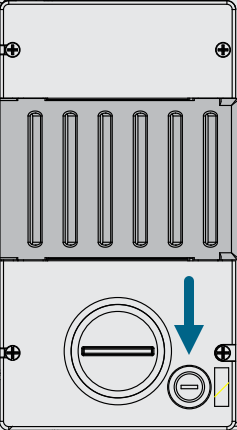


These are the most frequent causes:

CauseResolution
Incorrect AC WiringVerify that AC connections are correct for AC~ supply voltage before installing new fuse.
Incoming Power SurgeCheck for lightning damage in vicinity
Wire Path Issue
  1. Power down the controller.
  2. Remove the wire path(s) from the decoder module.
  3. Power controller back up with no wire paths with a good fuse.
    • If display, and module lights up, then there is a wire issue on a path. Inspect path wiring.
    • If multiple paths, connect each path individually to determine the path with the short.
Bad ADM Module
  1. If wire paths are removed and the fuse continues to blow, then power down controller.
  2. With wire paths removed, remove the ADM decoder module.
  3. Install new fuse and power up controller.
  4. If the master module P/MV light flashes and the facepack lights up, the decoder module (ADM99) will need to be replaced.
Bad Master Module
  1. If the wire paths and the ADM decode module are removed and the fuse continues to blow, then power down the controller.
  2. Remove the Master Module.
  3. Install new fuse and power up controller.
  4. If the facepack lights up, the Master Module (572000) will need to be replaced.

Still need help? We're here.

Tell us what you need support with and we'll find the best solution for you.

Contact Support