

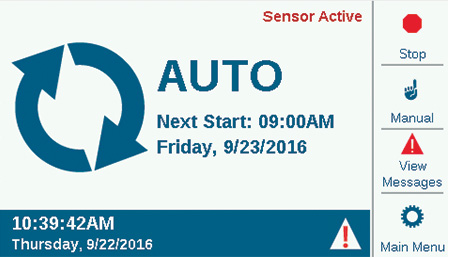
The Home screen displays key system information and provides soft-key shortcuts to commonly used functions. The current date and time are shown along the bottom-left border.
| Icon | Description |
|---|---|
 | The triangle symbol flashes in the lower right corner; the controller has detected a serious situation. A soft key will change to View Messages, for more information about the condition. The messages screen allows you to clear a message or select View Logs for more details. Messages on the screen do not interfere with normal irrigation. |
 | If Solar Sync is installed and enabled (Devices menu), the Solar Sync symbol shows the current adjustment percentage in the lower right of the border |
 | A communication module is installed and connected. The lower two boxes will always remain white. |
 | A communication module is installed and not connected. The lower two boxes will always remain white. |
| Sensor Active | If sensors are active (alarmed), this is indicated in red text in the upper-right corner. |
When the controller is running stations, the Home screen becomes the Activity screen, with additional information and functions. All running stations are displayed, along with the program running them, the mode in which they are running, and the remaining runtime on the station.
Individual items may be selected directly from the Activity screen and stopped without affecting other irrigation. See Selective Stop section.
The soft keys normally show Stop, Manual, View Flow (shows current flow if a flow sensor is installed and enabled), and Main Menu. Stop and Manual are described in the Basic Programming section. View Flow is described in detail in the Flow Operations section.
Still need help? We're here.
Tell us what you need support with and we'll find the best solution for you.