

Each decoder is programmed with the station address(es) at the controller before installing it in the 2-wire path. The decoder output module has two holes in the lower right called “Programming Port.” Program the station number(s) into the decoders, and then write the station number assignments on the metallic tag on the decoders. Before programming any stations, you should have an exact plan on paper for the location of each decoder and station in the system. ICD decoders are available in 1-, 2-, 4-, and 6-station sizes, and they can be mixed in the same system. When a decoder is programmed through the controller ports, its station numbers are assigned automatically based on the decoder’s size. For example, an ICD-200 programmed as station 5 will have its second output automatically assigned to station 6.
IMPORTANT: Do not program the same station number into two different decoders. A duplicate address will result in a communication failure.
- Turn the controller power On.
- Insert the Red/Blue wires from the decoder into the Programming Port holes.
- Turn the controller dial to the Advanced Features position.
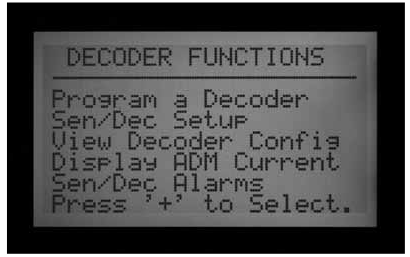
- Use the down arrow button to select Decoder Functions. Press the + button to select.
- Press + to select Program a Decoder. The decoder output module will check for the presence of a decoder. If the wires are correctly inserted into the Programming Port, a screen will appear with the decoder settings.
- If a decoder is recognized, the display will show current settings for the decoder. If the decoder is recognized as a station decoder, the size of the decoder (1, 2, 4, or 6) will show in the Dec Type area. Decoder type can be Station or Pump. Most decoders in most systems are type “Station”, which activate irrigation solenoids.
- When the decoder settings are correct, push the Program button to send them to the decoder. The display will show “Programming…” for a few seconds until the information is downloaded into the decoder.
- If the programming (of the decoder) is successful, the display will show Programming Complete. If not, repeat the process.
- When all decoders and stations have been programmed, turn the dial to Run or any other position to continue working with the controller.
- Station number (When Dec Type is “Station”) can be any number from 001 to 099. Do not allow more than one decoder in a system to have the same station number!
- ICD-HP Tool :This can be used to program a multistation decoder to address stations that are not sequential. For example, an ICD-200 can be programmed as station 5 and station 9.
- Power Factor is normally 2 and this is correct for most installations. Possible range is 1 to 5. In certain situations, it may be necessary to change this value to hold in heavier solenoid loads. These values will change the duty cycle of the power supplied to the decoder from 10 to 38% in approximately 7% increments. This value should not be adjusted unless absolutely necessary, as it may adversely affect the performance of the rest of the system.
- Inrush is normally set to 3 and this is correct for most installations. Possible range is 1 to 9. These values will change the timing of the initial powering of the solenoid from 0 to 90 mS in 10 mS increments to aid in activating solenoids and relays with higher inrush current requirements.
Still need help? We're here.
Tell us what you need support with and we'll find the best solution for you.